

making it work #7
dictation tools, head to head + prototyping and Slock!


This is the seventh post in a new series called making it work, where I document what I’m actually building with AI, what broke, what surprised me, and what it means if you’re a marketer who keeps hearing terms you don’t know but nodding like you know what it all means.
battle of the voice dictation tools
I’ve been saying Willow is better than Wisper Flow, but I also used to be a fan of Superwhisper, so I figured it was time to actually show you instead of just saying it.
I ran a test. I read the same paragraph from all three tools (a passage from On Writing Well, which I’ve been reading. It had me thinking about publishing cadence and whether I edit enough. The premise of this Substack is that it’s all first drafts, but I’m reconsidering that a little.)
Here’s how the paragraph came out:
Superwhisper
Rewriting is the essence of writing well. It’s where the game is won or lost. That idea is hard to accept. We all have an emotional equity in our first draft. We can’t believe that it wasn’t born perfect, but the odds are close to 100% that it wasn’t. most writers don’t initially say what they want to say or say it well as they could the newly hatched sentence almost always has something wrong with it it’s not clear it’s not logical it’s verbose it’s clunky it’s pretentious it’s boring it’s full of clutter it’s full of cliches it lacks rhythm it can read in several different ways
Accurate, clean output. One thing I like about Superwhisper beyond the transcription is their privacy policy. It runs locally on your computer, which matters if you’re dictating anything sensitive. Superwhisper leans local by default.
Willow
rewriting is the essence of writing well. It’s where the game is won or lost, the idea is hard to accept.
We all have an emotional equity in our first draft. We can’t believe that it wasn’t born perfect, but the odds are close to 100% that it wasn’t.
Most writers don’t initially say what they want to say, or say it as well as they could. The newly hatched sentence almost always has something wrong with it. It’s not clear, it’s not logical, it’s verbose, it’s clunky, it’s pretentious, it’s boring, it’s full of clutter, it’s full of clichés.
It lacks rhythm. It can read in several different ways.
Most accurate of the three in this test and in my daily life. While it didn’t put everything in one paragraph, the punctuation is also the most accurate.
This format also makes it easy to edit. If you’re dictating something you want to edit, breaking it into chunks makes editing easier. The formatting felt more editor-friendly.
I like the UI toggle, which makes it easy to switch on and off. Some people don’t like the toggle, so it depends on your personal preference!
Wispr Flow
Rewriting is the essence of writing well. It’s where the game is won or lost. That idea is hard to accept. We all have an emotional equity in our first draft. We can’t believe that it wasn’t born perfect, but the odds are close to 100% that it wasn’t. Most writers don’t initially say what they want to say or say it as well as they could. The newly hatched sentence almost always has something wrong with it:
It’s not clear.
It’s not logical.
It’s verbose.
It’s clunky.
It’s pretentious.
It’s boring.
It’s full of clutter.
It’s full of cliches and lex rhythm, and it can be read in several different ways.
Wispr Flow is the most popular of the three, but it's not as accurate as Willow in transcription or punctuation. I like the clear, short sentences, though. This is more editor-friendly than Superwhisper.
Verdict: I like Willow the best for now! But Superwhisper is the one I’d choose if privacy is the priority.
Magic patterns for prototyping
Been testing magic patterns this week. It’s different from lovable or v0.
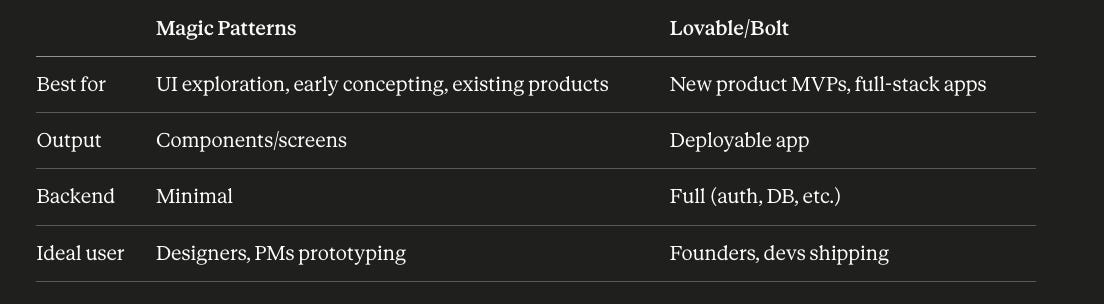
It’s a prototyping tool. Specifically for UI exploration and early concepting rather than MVPs.
You can run commands to explore different versions of a design, toggle through variations, see how things might look before you commit. It’s more for product designers and PMs than for someone trying to ship a feature.
I found this useful when much of the design was already done, and I had to imagine flows for my skincare app. Marketers doing prototyping work would get value from it too.
I’d put it in the stack after Variant, not instead of it. Variant for generating the initial design direction, Magic Patterns for UI explorations once you know roughly what you want.
Two things I’m testing next week
Clipchamp: I’ve been getting more into making product demos, and this is next on the list.
Slock, not Slack: Discovered this through a Vancouver event they were hosting and am curious about it!
Poll
Subscribe if you want this in your inbox every two weeks. Honest, mid-process, no clean answers. Or reply and tell me what you’re building. Going to be doing this every Thursday!
Love clip champ curious to hear your take on it. Descript is still king for me because of transcript-based editing and the automatic transitions, but clipchamp is a close second. Where dscript can do a terrible job sometimes.